
Download Hairpaca – AI Hairstyle Virtual Try‑On Tool
Overview – What Is Hairpaca?
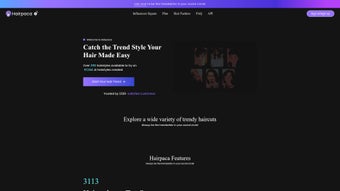
Hairpaca is a cutting‑edge, AI‑driven web application that lets anyone experiment with hair styles without stepping into a salon. By uploading a single selfie, the platform instantly generates realistic visualizations of hundreds of haircuts, colors, and textures, ranging from classic bob cuts to avant‑garde runway looks. The AI engine analyses facial geometry, head shape, and existing hair density to ensure each virtual try‑on respects natural proportions, creating a believable preview that feels almost as if you were looking at a mirror after a professional makeover.
Hairpaca targets both casual users who simply want to see how a new shade might suit them and professional stylists who need a quick, visual aid during client consultations. The tool is completely browser‑based, meaning there is no bulky download, no need for a powerful GPU, and no operating‑system constraints beyond a modern web browser. Security is baked in: all image uploads travel over SSL, are processed in memory, and are deleted after the session unless you deliberately save them to your personal “Style Lib.” In addition to the core try‑on feature, Hairpaca offers a community gallery where users showcase their transformations, a trend‑driven catalog that receives weekly updates, and one‑click sharing options for Instagram, Facebook, and Pinterest.
The combination of free access, high‑quality AI rendering, and a seamless user experience makes Hairpaca a standout tool in the lifestyle‑software niche.
Key Features and Personal Style Library
- AI‑powered hairstyle simulation that adapts to facial contours, hair type, and lighting conditions.
- More than 2,500 curated hairstyles, including gender‑neutral cuts, braids, curls, up‑dos, and color palettes ranging from natural tones to bold fashion colors.
- Instant selfie upload with automatic background removal, edge detection, and hair‑line refinement for a clean preview.
- Dynamic sliders for length, volume, and color intensity, enabling fine‑tuned adjustments on the fly.
- Personal “Style Lib” where users can bookmark, label, add notes, and organize favorite looks into custom collections.
- Side‑by‑side comparison mode that displays up to three hairstyles simultaneously for easy decision‑making.
- Real‑time rendering directly in the browser—no plugins, no downloads, and no performance lag on standard devices.
- Secure cloud storage protected by SSL/TLS encryption, with automatic expiration of temporary files.
- Community gallery featuring user‑submitted transformations for inspiration and trend spotting.
- One‑click sharing to major social platforms and ability to export PNG or PDF files for offline reference or salon consultations.
- Regular seasonal updates that add new trends, holiday‑specific styles, and emerging color techniques.
Installation, Usage Guide & System Compatibility
Hairpaca eliminates the traditional installation friction associated with many beauty‑tech tools. Because it is a fully cloud‑based web app, you simply open a supported browser, navigate to hairpaca.com, and you are ready to start experimenting. The service is optimized for the latest versions of Chrome, Firefox, Safari, and Edge, delivering consistent performance on Windows 10/11, macOS Catalina and later, as well as on Android 8.0+ and iOS 13+. The responsive design automatically adjusts the UI for desktop monitors, tablets, and smartphones, ensuring a smooth experience regardless of screen size.
To begin, click the prominent “Upload Selfie” button, choose a high‑resolution portrait taken in natural lighting, and let the AI analyze your facial landmarks. Within 2–3 seconds a carousel of suggested hairstyles appears. You can scroll through the catalog, tap any style to view a larger preview, and use the on‑screen sliders to tweak length, volume, and color saturation. The “Add to Style Lib” icon saves the look to your personal library, where you can rename the entry, add styling notes, or categorize it under custom tags such as “Wedding,” “Career,” or “Summer.” If you are logged in, your library syncs across devices, so you can start a session on your phone and continue on a desktop later.
Because the rendering engine runs on remote servers, the only hardware requirement is a stable internet connection. Even low‑end smartphones can generate high‑quality previews, as the heavy AI computation is performed in the cloud. For users who need offline reference material, the “Export” button downloads a PNG image of the chosen style, while the “Print‑Ready PDF” option bundles the image with styling tips, recommended products, and a QR code that links back to the exact configuration in Hairpaca.
Pros, Cons and Frequently Asked Questions
Pros
- Entirely free with no hidden subscription fees.
- AI delivers photorealistic visualizations that closely mimic real‑world hair behavior.
- Cross‑platform compatibility: works on Windows, macOS, Android, and iOS browsers.
- Personal Style Lib organizes saved looks for quick retrieval and comparison.
- Secure cloud storage with SSL encryption and automatic deletion of temporary files.
- Regular content updates keep the hairstyle catalog fresh and on‑trend.
- No software download required; runs instantly in any modern browser.
Cons
- Requires an active internet connection; offline use is not possible.
- Static 2‑D images only; lacks 3‑D rotation or video previews.
- Advanced color nuances such as subtle highlights may not be perfectly replicated.
- Occasional loading delays on very slow networks or during peak traffic.
- No built‑in salon appointment booking or professional recommendation engine.
FAQ
Is Hairpaca truly free for all users?
Yes, Hairpaca offers all its core features—including the Style Lib, cloud storage, and export options—without any subscription or hidden fees.
Do I need to create an account to use Hairpaca?
Creating an account is optional. You can try hairstyles without signing in, but saving looks to your Style Lib requires a quick registration via email or social login.
How secure is my uploaded selfie?
All uploads travel over HTTPS, are processed in memory, and are automatically deleted after the session unless you deliberately save them to your library. SSL encryption protects the data during transmission.
Can I use Hairpaca on public computers or shared devices?
Yes. Because the service runs entirely in the browser, you can access it from any public workstation. Just remember to clear the browser cache or log out after your session if you signed in.
Does Hairpaca support hair color changes and custom shades?
Absolutely. The platform includes a comprehensive color palette with dozens of shades, from natural browns and blondes to vibrant blues and pastels. While the visual rendering is highly accurate, subtle effects like multi‑dimensional highlights may vary slightly from real life.
Is there a limit to how many styles I can save in the Style Lib?
No, Hairpaca offers unlimited storage for saved looks. All saved images are stored securely in the cloud, and you can organize them with custom tags and folders at any time.
Conclusion – Should You Download Hairpaca?
Hairpaca delivers a powerful combination of AI accuracy, an expansive hairstyle catalog, and a frictionless browser‑only experience that makes virtual hair experimentation both enjoyable and practical. Whether you are a fashion‑forward individual curious about a bold new color, a busy professional seeking a quick confidence boost before a meeting, or a stylist looking for a client‑engagement showcase, Hairpaca provides a secure, free, and instantly accessible solution. The personal Style Lib and community gallery add depth and social proof, while regular updates ensure you stay on top of emerging trends.
The main drawbacks—dependence on an internet connection and the lack of 3‑D rotation—are minor compared with the benefits of high‑quality visualizations and cross‑device convenience. If you are ready to see yourself in a fresh look without the commitment of a salon visit, click the link below, upload a selfie, and start experimenting. No download, no installation—just a few clicks and a world of hairstyles at your fingertips.
Visit Hairpaca now and try your next style for free.
Hairpaca stands out for its intuitive AI interface, extensive hairstyle library, and truly free access. The realistic renderings and secure cloud storage make it a reliable choice for both casual users and professionals. Minor issues like occasional loading delays on slow networks and the absence of 3‑D rotation do not significantly detract from the overall experience.
- Free and easy to use
- High‑quality AI rendering
- Cross‑device compatibility
- Robust Style Lib for organization
- Requires internet connection
- No 3‑D view or video previews



.png)



